
AV integrator production support · September 2026
From the first AV site survey to better project execution.
How Craftify helps AV integrators convert verified field information and approved design intent into coordinated CAD drawings, Revit models and practical documentation for procurement, installation, testing and handover.
Published · 11 min read
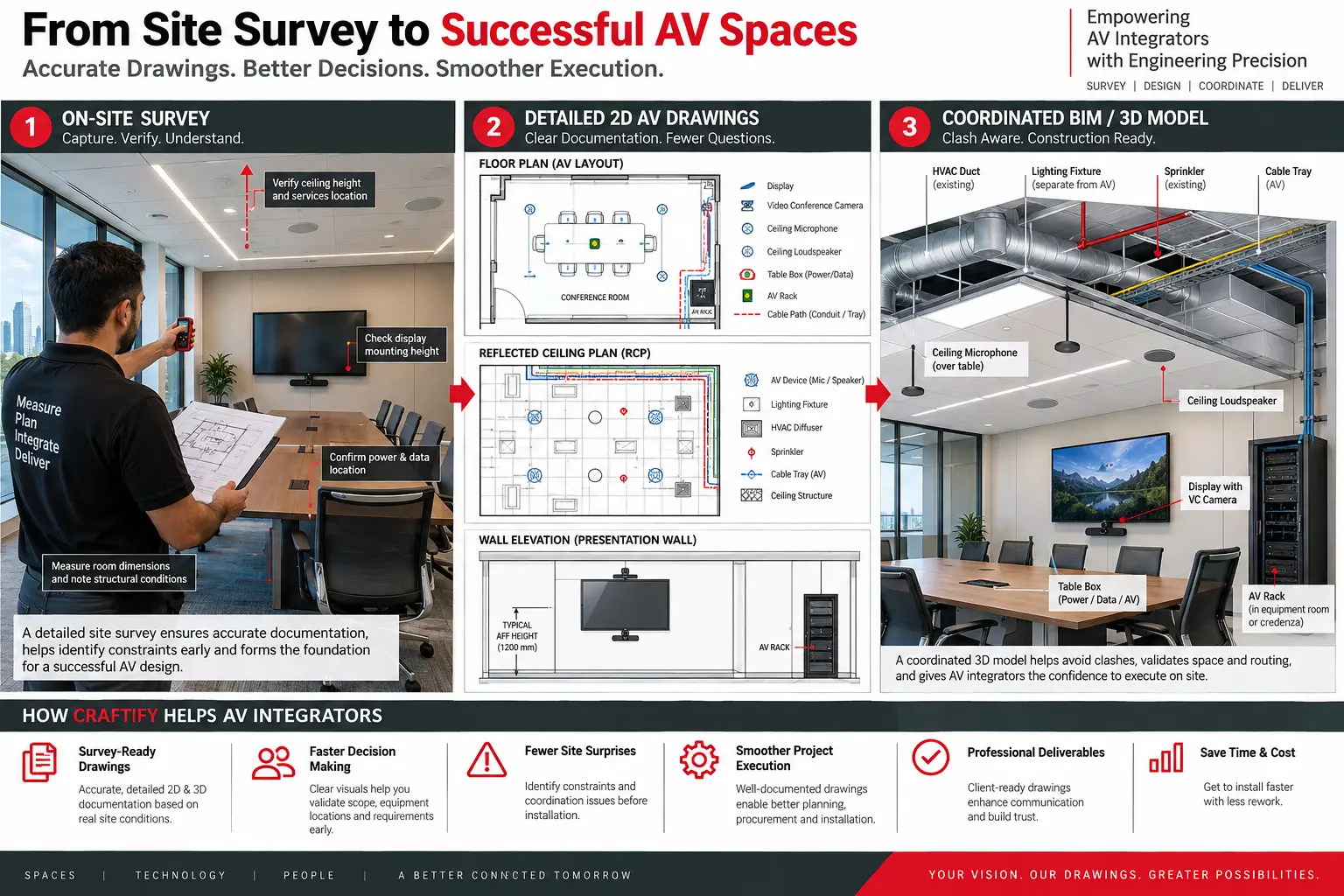
Why the first survey matters
The drawing package can only be as reliable as its inputs.
An AV site survey is not simply a collection of photographs. It is a controlled record of the existing space and the constraints that affect the proposed system: room geometry, ceiling type and height, wall construction, furniture, glazing, device locations, equipment-room access, pathways, power, data and interfaces with other trades.
When these inputs are incomplete, uncertainty moves downstream. A display elevation may lack confirmed backing. A camera may conflict with a door, feature wall or sightline. Ceiling microphones and loudspeakers may compete with lighting, diffusers, sprinklers or access panels. A rack may fit on a plan but fail to retain service clearance, pathway entry or cooling access.
Accurate drawings do not remove the need for field verification or engineering judgement. They give the AV integrator a controlled place to record verified information, expose missing decisions and coordinate the installation before labour and equipment reach site.
Survey-ready information
Capture what the project team will need later.
The exact checklist must follow the project scope, client standards and responsible engineer's requirements.
Room and mounting conditions
- Room dimensions, ceiling height and ceiling-system type
- Wall build-up, accessible backing and finish constraints
- Display, camera, loudspeaker and microphone locations
- Sightlines, furniture positions and accessible service zones
- Ambient-light and acoustic observations where required
- Photographs referenced to rooms, walls or survey markups
Infrastructure and interfaces
- Rack-room dimensions, access, power and cooling conditions
- Existing trays, conduits, sleeves, pull points and route constraints
- Available power and data outlets with source information
- Architectural, structural, electrical, IT and MEP interfaces
- Site access, ceiling access and working-hour restrictions
- Unknown or concealed conditions recorded as open items
Before the site visit
Use preliminary drawings to make the survey more productive.
A survey becomes more effective when the integrator arrives with a marked-up floor plan, room list, preliminary equipment concept and a list of known unknowns. Craftify can prepare survey backgrounds from the latest available architectural information, identify rooms and device categories, and create consistent markup layers or checklists.
This preparation helps the field team focus on decisions that cannot be made from an office: actual dimensions, accessible routes, concealed-condition indicators, mounting surfaces, installed services, rack access and conflicts between the proposed AV concept and the built environment.
Every survey file should carry a date, source and revision. Photographs should be traceable to a room and viewing direction. Assumed information should be visually distinguishable from field-verified information. This prevents a preliminary mark from silently becoming a construction fact.
From field notes to deliverables
Turn scattered inputs into one coordinated record.
Craftify can work within the integrator's title blocks, layers, families, parameter rules and issue procedures through defined AV CAD drawing and AV Revit/BIM production scopes.
Survey backgrounds
Clean floor plans, room identifiers, survey notes, photo references and existing-condition markups prepared from the latest approved source.
Plans and RCPs
Device tags, mounting locations, outlets, pathways and ceiling devices coordinated against architectural and available MEP information.
Elevations and sections
Mounting heights, display relationships, camera positions, millwork interfaces, clearances and installation zones shown in context.
Schematics and schedules
Approved signal relationships, device identifiers, cable references and schedule information kept consistent with the plan set.
Rack elevations
Equipment positions, rack units, patching intent, power distribution, cable management, airflow and service-access requirements documented for review.
Revit and BIM views
AV devices, racks and pathways placed in the coordinated building context for sections, schedules, clash review and issue tracking.
Revit and BIM coordination
Check spatial relationships—not only symbols.
A two-dimensional symbol can appear clear while the real device conflicts with structure, ductwork, lighting, sprinklers, access panels or millwork. Revit coordination adds spatial context: physical device size, mounting zone, orientation, service access and the relationship between AV equipment and the building model.
Linked models must be positioned using the project's agreed coordinate workflow. Autodesk documents shared coordinates as a way to establish the relative positions of multiple models and files. In Model Coordination, automatic clash workflows depend on stable element identifiers for supported file types. Those tools help teams find and track issues, but a clash-free result is not a technical approval: tags, sightlines, coverage, access, cable limits and design intent still require discipline review.
Model detail must also be purposeful. A declared LOD does not by itself confirm that every manufacturer dimension, connector, clearance or parameter is suitable for fabrication. The model uses, required geometry, information fields and tolerances should be agreed before production.
Execution impact
Clear documentation supports decisions at every stage.
Estimating and procurement: controlled device quantities, rack requirements and infrastructure notes give commercial teams a clearer basis for checking scope. Drawings do not replace the bill of materials, but discrepancies between drawings, schedules and equipment lists can be identified earlier.
Installation planning: coordinated device locations, elevations and pathway information help supervisors plan labour, access equipment, prefabrication and trade interfaces. Installers spend less time interpreting disconnected notes when tags and references agree across the set.
RFIs and revisions: when the source, status and owner of an open item are visible, the integrator can ask a focused question. Responses can then be incorporated into controlled revisions rather than remaining in emails or informal markups.
Testing and handover: consistent tags, cable references, rack records and device schedules improve traceability during verification and closeout. AVIXA's performance-verification standard provides a framework for defining what must be verified, when verification occurs, the criteria used and how results are reported.
Controlled production workflow
How Craftify can support the integrator.
The work begins with approved inputs and ends with traceable outputs—not undocumented assumptions.
Responsibility boundary
Documentation support must preserve design ownership.
Craftify works as an extension of the AV integrator's drawing and BIM team. We can organise approved information, develop documentation, model equipment, coordinate geometry, apply review comments and maintain drawing consistency.
Unless specifically included in the contracted scope, the responsible integrator, consultant and field team retain authority for system engineering, final equipment selection, network design and configuration, structural adequacy, electrical and MEP design, code compliance, site safety, concealed conditions, field dimensions, commissioning and final approval.
This boundary is important. Good production support should make technical decisions easier to review—not hide who owns them.
Questions AV teams ask
AV survey and documentation FAQ.
What should an AV site survey record?
The required record depends on scope, but commonly includes verified room and ceiling conditions, mounting surfaces, equipment and rack locations, pathways, power and data points, access constraints, photographs tied to locations, and open items requiring confirmation by the responsible project team.
Can drawings replace field verification?
No. Drawings organise and communicate verified information, but dimensions, concealed conditions, structural capacity, available services and installation constraints must be confirmed by the responsible field and engineering teams.
When should AV use CAD and when should it use Revit?
CAD is effective for plans, schematics, rack elevations and detailed sheets. Revit is valuable when AV devices, spaces and pathways must be coordinated spatially with architectural, structural and MEP models. Many projects use a controlled combination of both.
How can Craftify support an AV integrator?
Craftify can extend an integrator's production capacity by developing CAD drawings, Revit models, coordinated views, schedules, rack elevations and revisions from approved project inputs and the integrator's standards. Engineering authority and field verification remain with the designated project parties unless separately contracted.
Technical references
Sources checked for this guide.
Flexible AV documentation capacity
Start with one pilot drawing package.
Share the available backgrounds, survey information, scope, standards and required issue date. Craftify can review the inputs and propose a practical CAD or Revit production approach.