
Networked AV documentation · September 2026
AV-over-IP documentation and BIM coordination.
A technical guide for AV integrators coordinating networked endpoints, equipment racks, cable pathways, power requirements and multidisciplinary project information across CAD drawings and Revit models.
Published · 12 min read
The documentation shift
AV-over-IP changes more than the schematic.
AV-over-IP transports audio and video as data packets across network infrastructure rather than relying only on dedicated point-to-point signal cabling. The approach can improve scalability and routing flexibility, but it also makes bandwidth, latency, interoperability, security and IT coordination part of the project conversation.
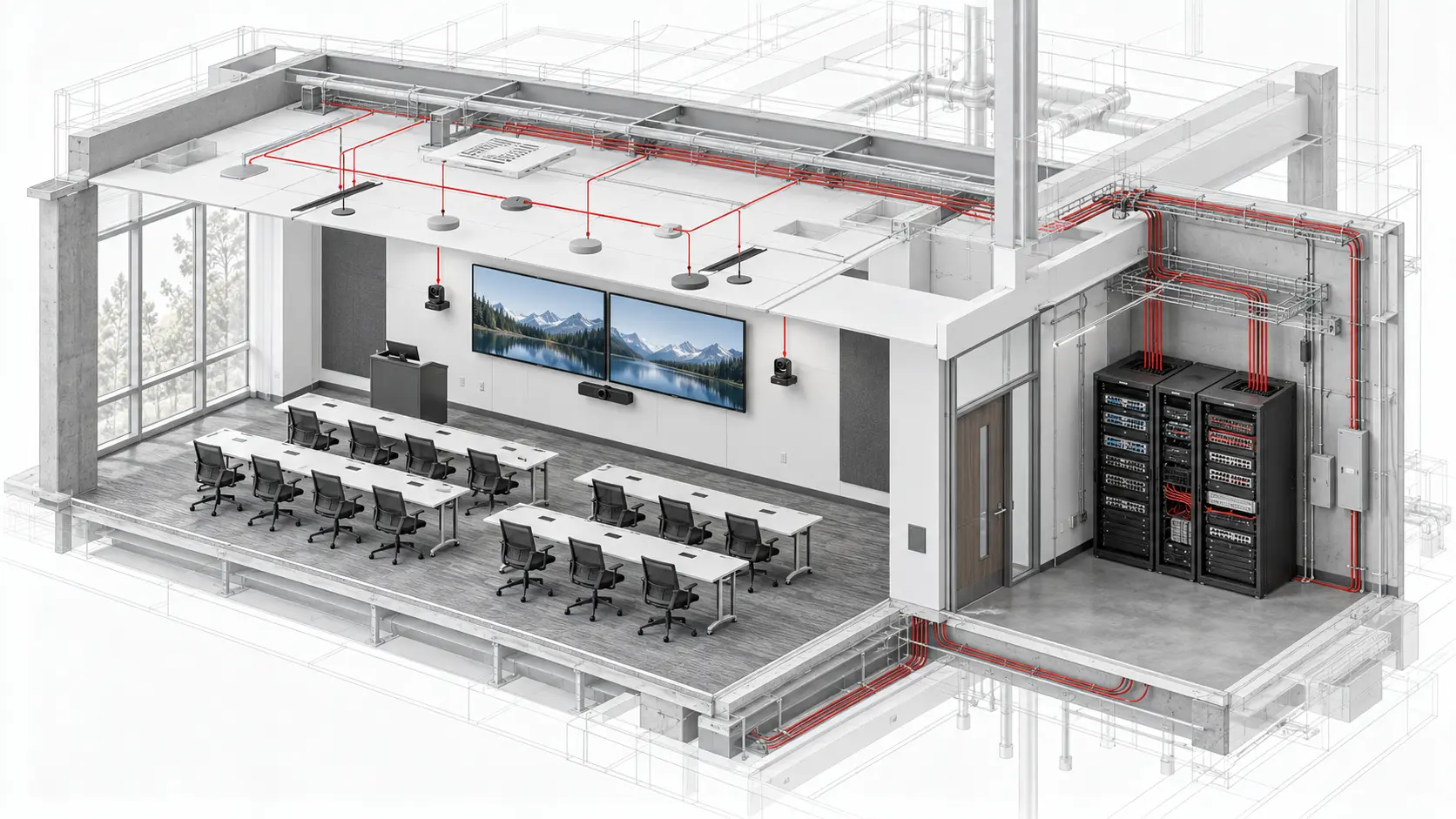
For an AV integrator, the drawing package must connect the logical system design to physical installation requirements. Encoders, decoders, switches and networked AV endpoints still require coordinated rack space, mounting, power, cooling, access, outlets and cable pathways.
Important scope boundary: a BIM model documents and coordinates approved physical and project information. It does not replace network engineering. Bandwidth calculations, VLAN architecture, multicast strategy, QoS, PTP clocking, cybersecurity and switch configuration remain with the responsible AV and IT design teams.
Controlled information
Build one consistent endpoint record.
Every networked AV device should be traceable across the model, plans, schematics, rack elevations and schedules.
Device identity
Use one approved device tag, room reference, system classification, equipment type, manufacturer and model across every deliverable.
Physical location
Record rack, wall, ceiling, furniture or field location together with mounting height, orientation and required service access.
Connections
Coordinate copper or fibre media, cable origin and destination, outlet reference, primary or redundant path and the related drawing callout.
Power method
Identify approved PoE or local-power requirements, power-source responsibility and any coordinated electrical outlet without assuming unconfirmed values.
Network fields
Add switch, port, VLAN, subnet or address data only where the project requires it and the responsible AV or IT team has approved it.
Coordination status
Track design status, model status, open questions, revision source and installation notes so incomplete information remains visible.
Network requirements
Document the design without inventing it.
Bandwidth: record the approved stream type, expected resolution, compression approach and uplink requirements where these affect equipment or infrastructure. AVIXA notes that bandwidth, latency, compression and interoperability are core AV-over-IP selection considerations.
Multicast and IGMP: show whether an approved design depends on multicast and identify the responsible network segment. Audinate’s current guidance recommends IGMP snooping where multicast use is significant; it also states that one IGMP querier should be elected per VLAN.
QoS: document the project’s approved requirement rather than applying a generic note. Dante uses standard DiffServ/DSCP QoS with strict-priority queuing to prioritise clock and audio traffic.
Clocking and subnets: large Dante systems need deliberate consideration of device count, clock-leader capability, subnet boundaries and cross-subnet flows. Audinate currently publishes clock-leader ceilings of 40 followers for specified lower-capability chipsets and 250 for specified higher-capability chipsets. These are product-specific network-design limits—not general BIM rules—and must be checked against the selected hardware and current manufacturer guidance.
Physical coordination
Model what installers must fit and reach.
Logical connectivity only becomes useful when the associated equipment and infrastructure can be installed, serviced and commissioned.
Equipment racks and rooms
- Rack-unit allocation, equipment depth and spare capacity
- Network switches, patch panels and fibre enclosures
- Front, rear and side service clearances
- Power distribution, UPS and earthing requirements
- Heat load, ventilation and cooling coordination
- Copper and fibre pathway entry points
Field infrastructure
- Device mounting, orientation and access zones
- Data outlets and approved local-power points
- Cable trays, conduits, J-hooks and sleeves
- Maximum cable-distance constraints from the design
- Separation, bend radius, service loops and firestopping
- Primary and redundant pathway requirements
Revit coordination
Review AV endpoints in their real building context.
Ceiling-mounted cameras, microphones, loudspeakers, projectors and access points must be reviewed against lighting, diffusers, sprinklers, access panels, ceiling grids, structure and cable containment. Wall-mounted displays and cameras require coordinated heights, sightlines, backing, millwork, glazing, door swings, power and data.
Revit supports spatial coordination, schedules, sections and issue-ready views. Autodesk Model Coordination supports automatic clash workflows with RVT and tracked NWC files, along with supported DWG and IFC content. Autodesk specifically advises enabling Convert Element Ids when exporting NWC from Revit so the file can be recognised for automatic clash detection.
Clash detection should support—not replace—technical review. A clash-free model can still contain a wrong tag, insufficient service clearance, an incomplete route or an unapproved device move.
Current industry development
IPMX has moved into formal certification.
IPMX is a set of open standards and specifications that extends SMPTE ST 2110-based media transport and NMOS-based control into professional AV environments. It adds defined capabilities for compressed and uncompressed workflows, simplified timing, HDCP and system profiles.
This is no longer only a future concept. AIMS reported that the first formal certification event certified 48 products in January 2026. Its second event in August 2026 certified 14 additional products, with the tested capabilities published through the IPMX registry.
For documentation teams, the practical lesson is not to label every networked system “IPMX.” Record the actual specified protocol, certified product capability and system boundary. Open-standard terminology should be used only when it matches the approved equipment and design.
Recommended output
AV-over-IP documentation package.
The exact deliverables depend on scope and project stage, but a coordinated package commonly connects these documents.
AV plans and RCPs
Endpoint positions, outlets, pathways, device tags, mounting notes and coordinated architectural backgrounds.
System topology
Approved logical relationships between sources, transmitters, receivers, switches, destinations and system boundaries.
Rack elevations
Network and AV equipment positions, patching, cable management, power, ventilation and service clearances.
Device schedules
Controlled identity, location, connection media, power method, host equipment and approved project parameters.
Coordinated BIM model
AV devices, racks, pathways and installation zones reviewed with architectural, structural and MEP information.
Open-item register
Unapproved network data, clashes, missing inputs, design questions and responsibility assignments kept visible.
Quality control
AV-over-IP coordination checklist.
Complete this review against the current approved design before drawings or models are issued.
Information check
- Device tags match plans, schematics, racks and schedules
- Endpoint locations and mounting heights are approved
- Copper, fibre and redundant links are distinguished
- PoE and local-power responsibilities are coordinated
- Network fields are approved—not assumed
- Open questions and revision sources are recorded
Constructability check
- Rack units, depth, airflow and access are verified
- Pathways reach every endpoint and equipment room
- Design cable-distance limits have been considered
- Ceiling and wall devices are coordinated with other trades
- Penetrations, sleeves and firestopping are identified
- The model and issued sheets use the same revision
Questions AV teams ask
AV-over-IP and BIM FAQ.
Does BIM coordination replace AV-over-IP network design?
No. BIM coordinates physical devices, spaces, racks, pathways, power, access and approved data. Network topology, bandwidth, VLANs, QoS, multicast, security and switch configuration remain the responsibility of the designated AV and IT engineering teams.
What AV-over-IP data should be included in a Revit model?
Useful approved parameters can include device tag, room, system, equipment type, mounting height, host rack, connection type, power method, cable origin and destination, pathway requirement and coordination status. Project-specific network fields should only be added when approved and required.
Should AV-over-IP projects use CAD or Revit?
Many projects use both. CAD is effective for schematics, network topology, rack elevations and connection schedules. Revit supports spatial coordination, device placement, pathways, sections, schedules and model-based clash review.
What is IPMX and why is it relevant to AV integrators?
IPMX is a set of open standards and specifications extending SMPTE ST 2110-based transport and NMOS-based control for professional AV. Its formal product-certification programme gives integrators a published basis for checking tested interoperability capabilities.
Technical references
Sources checked for this guide.
AV CAD and BIM production support
Need additional documentation capacity?
Craftify supports AV integrators with CAD drawings, Revit modelling, rack elevations, cable-pathway documentation and BIM coordination. Start with one defined pilot package using your standards.