
AV drafting · AV design · AV drawing services
AV drafting, AV design and AV drawing services: how the workflow fits together.
Great AV projects depend on more than a good equipment list. The design intent has to be translated into clear, coordinated and buildable documentation. This guide explains how AV design, AV drafting and AV drawing services work together—and where each one adds value to an integrator's delivery process.
Published · 10 min read
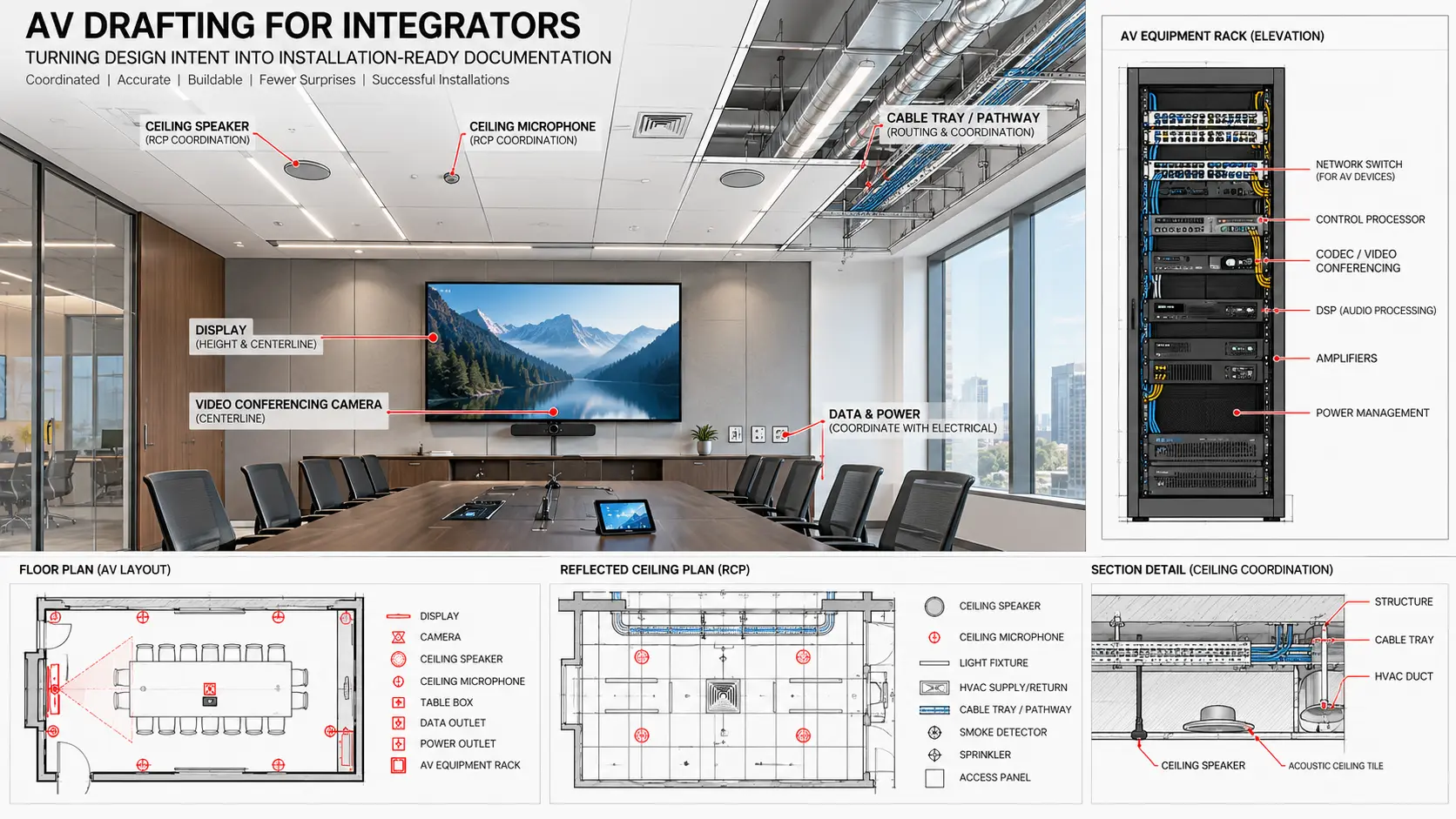
Clear roles, better documentation
AV design and AV drafting are connected—but they are not the same task.
AV design establishes the technical intent of the system: what the room needs to achieve, the equipment strategy, user experience, signal flow, coverage, interfaces and performance expectations.
AV drafting takes that approved intent and develops the technical information required by the project team. That means turning markups, design notes, equipment schedules and coordination inputs into structured AV drawings that can be reviewed and issued.
The strongest workflow is not design versus drafting. It is a controlled handoff between the two, followed by clear review, coordination and revision stages.
A practical AV documentation workflow
From approved AV design intent to issue-ready drawings.
A good AV drawing service should fit around the integrator's existing engineering process—not create a separate one.
Design inputs
Start with approved room requirements, equipment lists, consultant information, architectural backgrounds, client markups, standards and any existing sketches or system diagrams.
AV drafting setup
Set up title blocks, drawing numbers, layers, Revit templates, symbols, families, naming conventions and sheet standards so the new documentation matches the integrator's established workflow.
Drawing development
Develop coordinated plans, RCPs, elevations, schematics, rack elevations and details while keeping device tags, room names, equipment references and drawing relationships consistent.
Coordination review
Compare the AV drawing set with architecture, reflected ceilings, furniture, electrical information, pathways and other project inputs. Where information conflicts, flag it for review rather than silently assuming.
Revisions
AV projects change. Equipment substitutions, client comments, construction updates and site conditions can all trigger drawing revisions. A controlled revision process keeps the package aligned through each issue.
As-built closeout
Final redlines and confirmed field changes can be incorporated into as-built documentation so the completed drawing set reflects what was actually installed.
What an AV drawing set can contain
AV drawing services should respond to the project—not force every job into the same package.
Depending on the room type, construction stage and project standards, an AV drawing package can include floor plans, reflected ceiling plans, wall elevations, mounting details, sections, system schematics, rack elevations, cable routes, pathway information, power coordination, device schedules and Revit/BIM views.
A small meeting room may need only a focused set of drawings. A multi-floor corporate project or BIM-coordinated development may require dozens of sheets, repeated room types, coordinated models and several review cycles.
The objective is the same in both cases: make the AV scope understandable to the people who need to review, coordinate, procure, install and maintain it.
Core AV drawing types
The drawings that usually carry the most project information.
The exact sheet list varies, but these are common deliverables in professional AV drafting workflows.
AV floor plans
Show device locations, room references, wall interfaces, floor boxes and key installation information against the architectural background.
Reflected ceiling plans
Coordinate ceiling-mounted loudspeakers, microphones, projectors, cameras, sensors and other devices with lighting, HVAC and ceiling systems.
AV elevations & sections
Communicate mounting heights, display positions, camera locations, wall plates, furniture interfaces and installation relationships that cannot be understood from plan alone.
System schematics
Translate the AV design into signal relationships between sources, endpoints, processing, control, network interfaces and rack equipment.
Rack elevations
Organize rack-mounted equipment, RU positions, blanking space, patching and related notes so installation teams can understand the intended rack arrangement.
Revit / BIM documentation
Place AV devices in a coordinated project model, support sections and schedules, and help identify spatial conflicts before the information reaches site.
CAD or Revit?
The right AV drafting platform depends on the project environment.
CAD-based AV drafting remains efficient for schematics, rack elevations, device plans, details and projects where the wider team is working primarily with 2D information.
Revit-based AV drawing production becomes valuable when the project requires model coordination, shared architectural context, sections, schedules, spatial checks and multidisciplinary BIM workflows.
Many integrators use a hybrid approach: Revit for coordinated spatial documentation and CAD for schematics or specialist technical sheets. The important point is maintaining consistency between the two environments.
Why drawing quality matters
Small documentation inconsistencies can create larger site questions.
AV drawings sit between design intent and installation. When they disagree with each other, site teams have to stop and interpret.
Device consistency
A device tag shown on a plan, elevation and schematic should refer to the same intended item and location.
Revision control
When equipment or room layouts change, related sheets should be reviewed together so older information does not remain elsewhere in the set.
Coordination visibility
Unresolved ceiling conflicts, missing mounting information or unclear pathways should be visible early enough for the project team to act.
Readable documentation
Clear annotation, sensible scale, consistent symbols and uncluttered layouts help both reviewers and installers use the drawing set efficiently.
External AV drawing service
Extra drafting capacity can help when the internal design queue gets busy.
AV drawing demand is rarely perfectly predictable. A large project can enter documentation at the same time as multiple smaller projects need revisions, submittals or as-built updates.
An external AV drawing service can add production capacity without requiring the integrator to change its standards. The external team can work within client title blocks, drawing conventions, CAD layers, Revit templates and review procedures.
For some teams, that means a single pilot project. For others, it means ongoing CAD or Revit support that operates as an extension of the internal design department.
Craftify's role
AV drawing support built around your engineering process.
Craftify supports AV integrators with AV drafting, AV drawing production, Revit/BIM modelling and technical documentation. We can work from approved design information and develop the drawing package within your standards and templates.
Typical support includes AV floor plans, RCPs, elevations, schematics, rack elevations, cable and pathway documentation, Revit modelling, BIM coordination, family creation and drawing revisions.
We can support a defined project scope or provide ongoing drawing capacity when your internal team needs additional production support.
FAQ
Common questions about AV drafting and AV drawing services.
What is AV drafting?
AV drafting is the development of technical audiovisual documentation from approved design information, markups, equipment schedules and project standards. Typical outputs include plans, RCPs, elevations, schematics, rack elevations, details and coordinated drawing sets.
What is the difference between AV design and AV drawing?
AV design defines the technical intent and system requirements. AV drawing translates that approved intent into documentation that can be coordinated, reviewed, installed and updated through the project lifecycle.
What can an AV drawing service include?
An AV drawing service can include CAD drafting, Revit modelling, BIM coordination, floor plans, RCPs, elevations, schematics, rack elevations, device details, cable pathway information, schedules and revision support, depending on scope.
Can Craftify follow our existing standards?
Yes. Craftify can work within your title blocks, CAD layers, Revit templates, families, symbols, naming conventions and review process so the documentation remains consistent with your internal standards.
AV drafting & drawing support
Need more AV drawing capacity without changing your workflow?
Share your drawing list, project inputs and documentation standards. Craftify can support a pilot project or ongoing CAD/Revit production as an extension of your delivery team.