
AV CAD drafting · Technical production workflow
How Craftify delivers an AV CAD drafting project.
A practical explanation of the information we need, how we develop and technically review the drawing set, what we communicate when something does not align, and what the integrator receives at final issue.
Published · 11 min read
More than drawing production
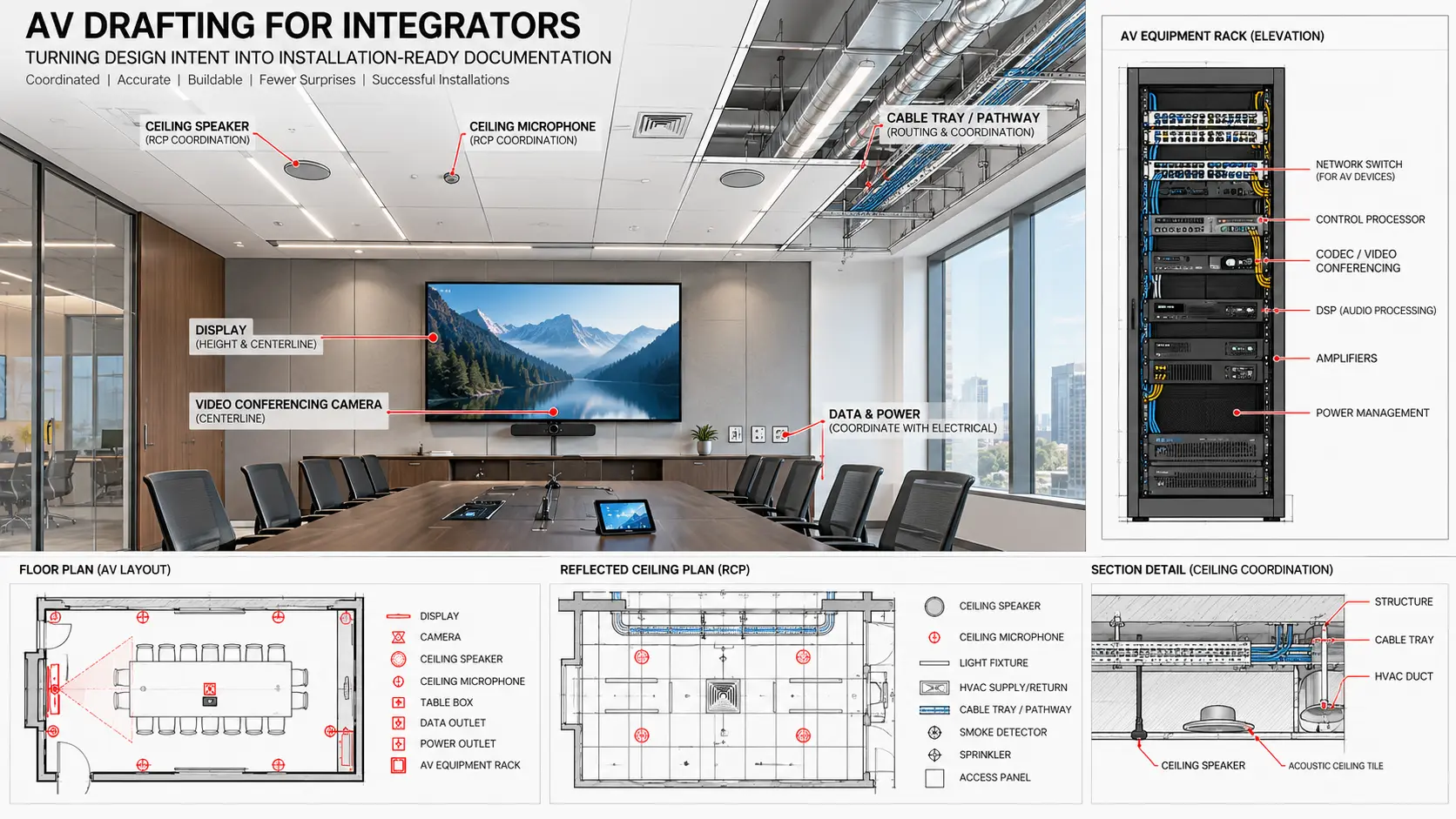
Good drafting connects design intent to field execution.
For an AV integrator, a drawing package is a working project-control tool. It links engineering information, architectural backgrounds, equipment schedules, survey conditions, rack requirements, installation details, coordination comments and revisions into documents that different teams can understand.
The objective is not simply to make CAD sheets look clean. The objective is to reduce ambiguity. An installer should be able to identify the device, its location, mounting condition, related detail and cable or system reference. A project manager should be able to see what changed. The engineering team should be able to review whether the documentation still reflects the approved design.
AVIXA's ANSI/AVIXA D401.01:2023 standard provides a framework for determining documentation requirements, creation responsibility and delivery tracking. That reflects how Craftify approaches a project: the drawing scope and ownership are established first, then the documentation is developed and controlled around those requirements.
Starting information
What we need at the beginning.
The required input varies by project stage. We review what is available, identify gaps and agree which information is approved, reference-only, assumed or still to be confirmed.
Core project inputs
- Latest architectural floor plans, RCPs, elevations and room details
- Defined AV scope, room list and required deliverables
- Approved equipment list, BOM or basis-of-design information
- Engineering markups, signal-flow information and design notes
- Site-survey drawings, photographs and verified field dimensions
- Project programme, drawing milestones and review dates
Documentation standards
- Client title block, CAD template, layers, fonts and plotting rules
- Device-tagging, cable-identification and naming conventions
- Mounting-height and dimensioning requirements
- Sheet numbering, issue status and revision procedures
- Required DWG version, PDF format and file-naming rules
- Project-specific notes, symbols, legends and sample deliverables
When an input is missing: we do not hide the gap or convert an assumption into an apparent fact. We record the open item, show its effect on the drawing where appropriate and request clarification from the responsible client contact.
Craftify workflow
How the drafting project moves from intake to issue.
Each stage creates a reviewable output so that drawing production stays aligned with the integrator's engineering and project-management decisions.
Scope alignment
We confirm the project stage, rooms, drawing list, source files, expected level of detail, review responsibilities, programme and final file formats.
Input audit
We check backgrounds, equipment information, markups and survey files for revision status, completeness and obvious conflicts before production begins.
CAD setup
We establish the title block, sheet register, xrefs, layers, annotation scales, plotting, device blocks and naming conventions required by the project.
Drawing development
We develop the agreed plans, RCPs, elevations, sections, schematics, rack drawings, pathways, schedules and details using the approved information.
Technical and QA review
We compare sheets, tags, dimensions, equipment and interfaces, then record visible technical concerns and missing decisions for client review.
Review and final issue
We incorporate consolidated comments, run a final issue check and package the controlled DWG, PDF and supporting files defined in the scope.
Technical thinking
We do not blindly draft what we receive.
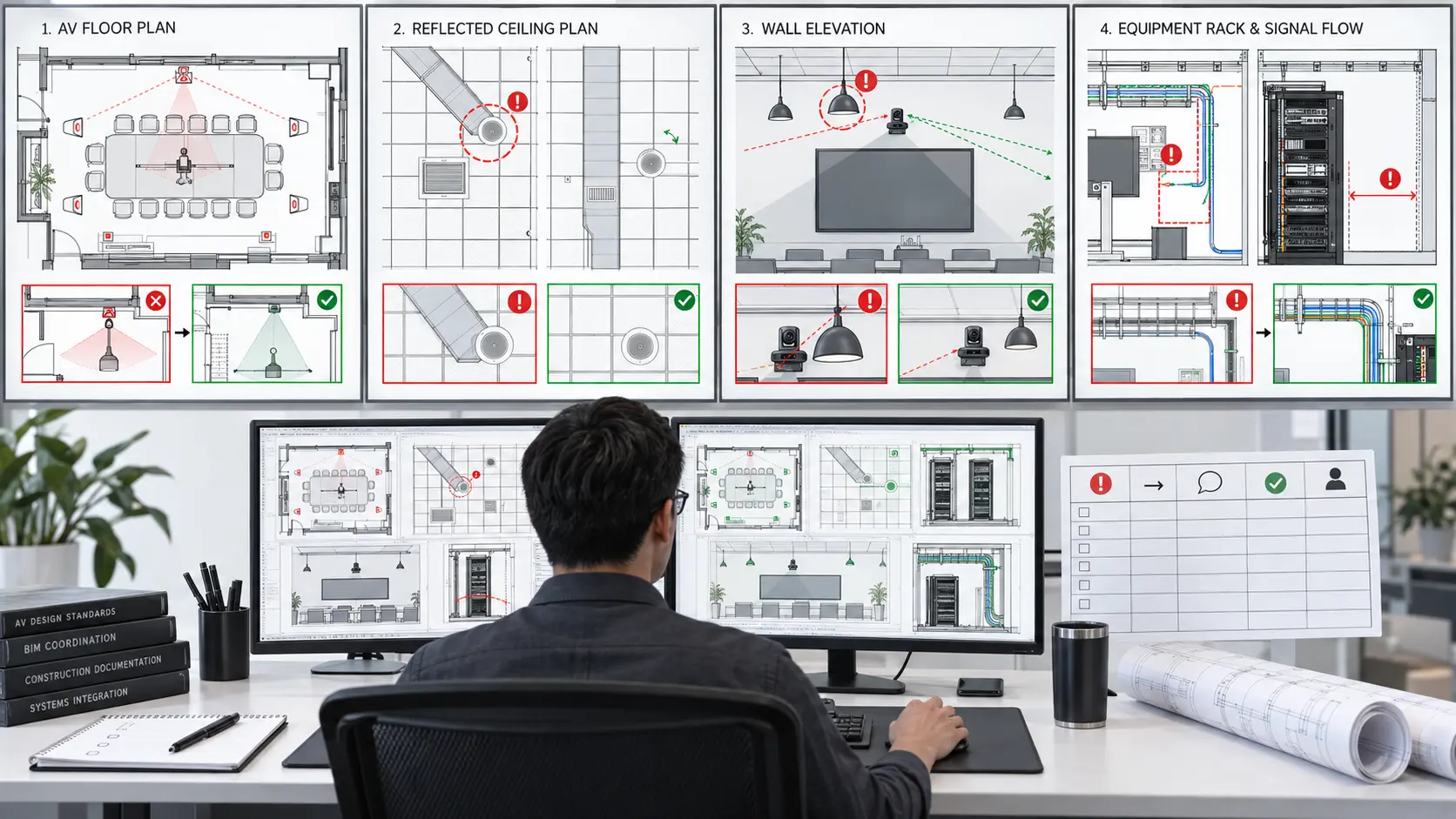
Drafting is not a substitute for AV engineering, but an experienced drafting team should recognise when information does not align. During production, Craftify reviews the relationship between the supplied documents and the physical installation being communicated.
Examples include a device shown on the plan but missing from the schematic or equipment list; conflicting tags between sheets; a display or camera mounting height that does not match the elevation; ceiling devices overlapping lighting, diffusers or structure; an incomplete cable route; insufficient rack depth or service space; missing power, data or backing; and a manufacturer clearance that has not been reflected in the detail.
When a concern appears, we first confirm that the latest source information is being used. Where appropriate, we check the client's standards, project documents and current manufacturer literature. We then issue a clear query, markup or RFI-style note describing the conflict, the affected drawing and the information required.
We do not make hidden design changes. If several solutions appear possible, we can show the options and their drawing impact, but the responsible integrator or engineer decides which option is approved. Once confirmed, we update the controlled set and preserve the revision trail.
Typical outputs
What the final deliverable can include.
The exact package is agreed before production. Not every project needs every drawing type.
AV floor plans
Device locations, tags, room context, displays, cameras, racks, furniture interfaces, outlets and references to related elevations or details.
Reflected ceiling plans
Ceiling loudspeakers, microphones, projectors and other AV devices coordinated against the available ceiling, lighting and MEP background.
Elevations and sections
Mounting heights, centre lines, display relationships, camera positions, wall interfaces, clearances and vertical coordination information.
System schematics
Approved logical signal flow, equipment relationships, connector references and cable identifiers. Schematics show connectivity, not necessarily physical routing.
Rack elevations
Rack-unit allocation, equipment arrangement, patching intent, cable management, power distribution and review notes for airflow and serviceability.
Schedules and details
Cable or I/O schedules, device schedules, legends, typical mounting details, pathway information, general notes and project-specific installation references.
How the issue set looks
Consistent, traceable and ready for review.
A professional drawing set should feel like one coordinated document, not unrelated sheets. Device tags on the floor plan should match the RCP, elevations, schematic, rack elevation and schedules. Detail references should lead to the correct sheet. Room names and numbers should follow the current background. Lineweights, annotation and plotting should remain legible at the intended sheet size.
The final transmittal can include native DWG files, issued PDFs, xrefs or bound files as agreed, plot-style information where required, a sheet register, a revision or comment record and any unresolved-item register that remains part of the agreed issue status.
For later stages, approved site redlines can be incorporated into record drawings. Those updates should reflect verified information supplied by the responsible field team; a record set should not be labelled as field-verified solely because CAD files were revised.
Quality control
Final AV CAD drafting checklist.
Before issue, the package is checked against the agreed scope and the latest approved inputs.
Information check
- Correct architectural background and revision are referenced
- Room names, numbers and sheet references are current
- Device tags agree across all relevant drawings and schedules
- Equipment shown aligns with the approved equipment information
- Required mounting heights, dimensions and notes are present
- Open items and assumptions remain clearly visible
Issue check
- Title blocks, issue dates and revision information are complete
- Layers, xrefs, lineweights, fonts and plotting are controlled
- Details and callouts point to the correct sheet and view
- Client comments are incorporated or recorded as unresolved
- PDFs are legible at the intended sheet size
- Native and issued files match the agreed transmittal list
Responsibility boundary
Technical review supports engineering—it does not replace it.
Craftify can identify visible conflicts, research product information, prepare coordination markups and maintain a technically consistent drawing set. Unless separately contracted, the designated integrator, consultant or engineer remains responsible for system design, equipment selection, performance criteria, network design, code compliance, structural suitability and final technical approval.
This boundary protects the project. The drafting team should think critically and communicate concerns, while the authorised design team remains in control of decisions.
Questions AV integrators ask
AV CAD drafting FAQ.
What inputs are required to start an AV CAD drafting project?
Typical inputs include the current architectural background, defined scope and deliverable list, approved equipment list, engineering markups or schematics, survey information, device tags, mounting requirements, client CAD standards, title block, required file formats and issue schedule. Missing information should be recorded as an open item rather than assumed.
What AV CAD deliverables can Craftify produce?
Depending on the agreed scope, deliverables can include AV floor plans, reflected ceiling plans, elevations, sections, details, system schematics, rack elevations, cable and I/O schedules, pathway drawings, legends, notes, revision records and approved record-drawing updates.
Does Craftify only trace the information supplied by the client?
No. Craftify reviews the supplied information for cross-drawing consistency, missing inputs and visible coordination or constructability concerns. Potential issues are documented and communicated to the client. We do not silently redesign the system; decisions and approvals remain with the responsible integrator or engineer.
Who remains responsible for AV engineering decisions?
Unless engineering services are explicitly included in the contract, the designated AV integrator, consultant or engineer remains responsible for system design, equipment selection, performance, code compliance and final approval. Drafting support develops and coordinates documentation from approved information.
Technical references
Sources checked for this guide.
AV CAD production support
Start with one defined pilot package.
Share the project scope, current backgrounds, engineering inputs, CAD standards and required delivery date. Craftify can review the information and propose a practical drafting workflow.